Hardening Your Nginx Reverse Proxy: Implementing Essential Security Headers for Next.js Apps
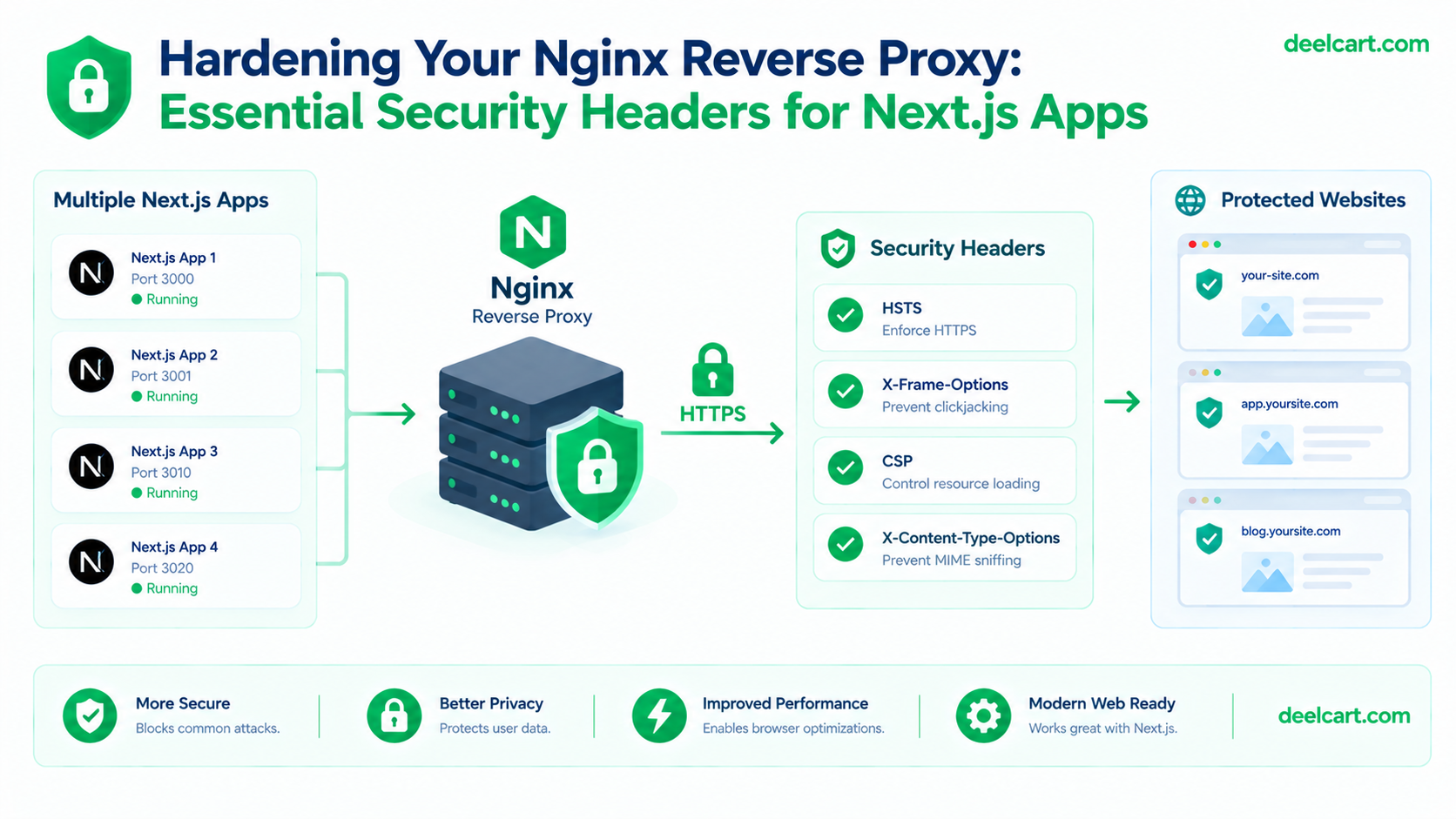
server block per domain, proxy_pass to the right port, done. What I hadn't done was anything about security headers, and a scan on a site like SecurityHeaders.com made that obvious immediately: an F grade, on a server that was otherwise working completely fine.Nothing about a functioning reverse proxy config implies secure headers are also configured — they're two entirely separate concerns, and Nginx's defaults don't add any of them for you.
What an F Grade Actually Means Here
The response headers a server sends aren't just informational — several of them are real protections against specific attack classes, and by default Nginx sends none of them:
- No
X-Frame-Optionsmeans another site can embed your pages inside a hidden<iframe>and trick users into clicking something they didn't intend to click on your actual site — clickjacking. - No
X-Content-Type-Optionsleaves the door open to a browser guessing (sniffing) a file's content type rather than trusting what the server declared, which has historically been exploitable to get a browser to execute something as script that was meant to be treated as plain data. - No
Strict-Transport-Securitymeans a browser will happily connect over plain HTTP if anything ever tricks it into trying, leaving room for downgrade or SSL-stripping style attacks even on a site that's otherwise fully served over HTTPS.
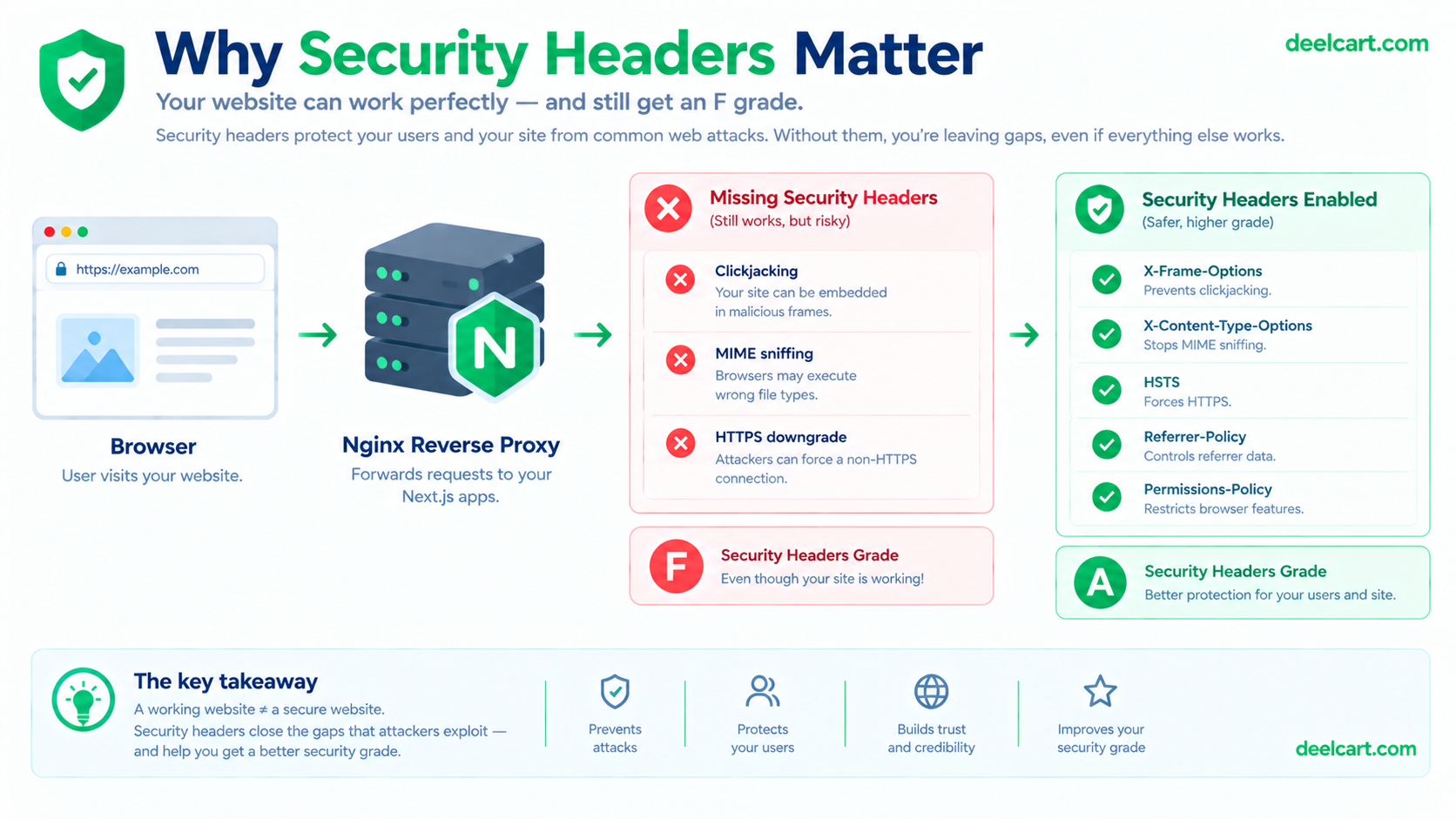
None of this means the site is actively being exploited — it means the browser-level protections against several well-understood attack classes simply aren't turned on.
Configuring This Globally, Once, at the Nginx Layer
Since I run multiple apps behind the same Nginx install, the sensible place to set baseline security headers is Nginx itself, once, rather than duplicating the same configuration inside every individual app. A shared snippet file works well for this:
# /etc/nginx/snippets/security-headers.conf

add_header X-Frame-Options "SAMEORIGIN" always;
add_header X-Content-Type-Options "nosniff" always;
add_header X-XSS-Protection "1; mode=block" always;
add_header Referrer-Policy "strict-origin-when-cross-origin" always;
add_header Permissions-Policy "geolocation=(), microphone=(), camera=()" always;
Then included in each domain's server block:
server {
    listen 443 ssl;
    server_name example.com;

    include snippets/security-headers.conf;

    location / {
        proxy_pass http://localhost:3006;
        # ... other proxy settings
    }
}
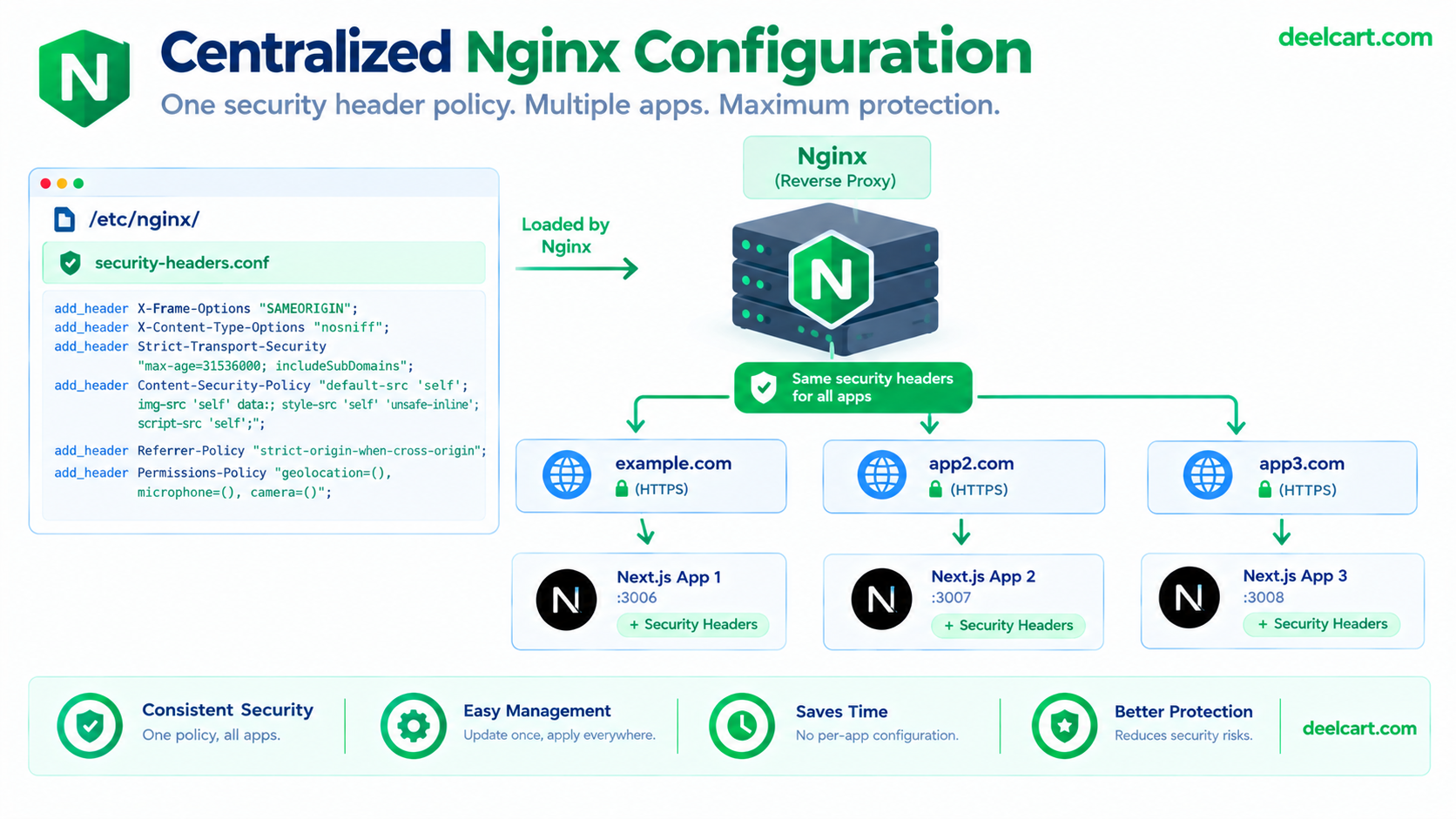
One file, included everywhere, rather than four separate copies that inevitably drift out of sync when I remember to update one server block and forget the others.
A quick note on what each of these actually does: X-Frame-Options: SAMEORIGIN blocks other domains from framing your pages entirely (this is the direct clickjacking fix). X-Content-Type-Options: nosniff stops the browser from overriding your declared content types. Referrer-Policy controls how much of your URL gets leaked in the Referer header when a user clicks a link away from your site — strict-origin-when-cross-origin is a reasonable default that limits what's shared cross-origin without breaking same-origin analytics. Permissions-Policy explicitly opts out of browser APIs (camera, microphone, geolocation) your site has no legitimate reason to request, which closes off a class of attacks that rely on tricking a user into unknowingly granting permission to embedded content.
X-XSS-Protection is worth a specific caveat: it's a legacy header for an XSS filter built into older versions of some browsers, and modern browsers have largely deprecated or removed the feature it controls. It's harmless to include for compatibility with older clients, but it isn't meaningful protection in a current browser — a real Content-Security-Policy is what actually matters for XSS defense today, and that's a deliberately bigger topic than a copy-paste header (see below).
The Big One: HSTS
Strict-Transport-Security (HSTS) tells a browser "always connect to this domain over HTTPS, for this long, no exceptions" — after a browser sees this header once, it won't even attempt a plain HTTP connection to that domain again until the max-age expires, which directly closes off SSL-stripping style downgrade attacks.
add_header Strict-Transport-Security "max-age=63072000; includeSubDomains; preload" always;This one needs real caution before deploying, for two specific reasons:
Only add this after HTTPS is fully working and verified. Once a browser has cached this header, it will refuse plain HTTP for the specified duration — if your HTTPS setup has a problem afterward, visitors are locked out of even falling back to HTTP until the max-age expires or they manually clear it. Confirm HTTPS works correctly on the actual domain first.
includeSubDomains applies to every subdomain, including ones that might not have HTTPS configured yet. If you add this and any subdomain isn't fully HTTPS-ready, that subdomain becomes unreachable over HTTP too, with no easy per-visitor workaround. Only include this directive once you're confident every current and near-future subdomain will be served over HTTPS.
preload is a request for browsers to hardcode your domain into a bundled list that enforces HTTPS before ever making a single request to it — submitting to that list is effectively permanent in practice (removal is possible but slow and not guaranteed across every browser), so it's worth treating as a one-way decision rather than something to add casually.
The Part Generic Tutorials Miss: Duplicate Headers From Next.js
Here's the issue that actually took me longer to figure out than the header configuration itself: Next.js has its own headers() function in next.config.js for setting custom response headers at the application level. If the same header is set both there and in Nginx, both get sent — Nginx doesn't overwrite an existing header from the upstream response by default, it appends alongside it, which means a client receives the same header twice.
// next.config.js — if this exists alongside the Nginx config above,
// you now have TWO X-Frame-Options headers on every response
module.exports = {
  async headers() {
    return [{
      source: '/(.*)',
      headers: [{ key: 'X-Frame-Options', value: 'SAMEORIGIN' }],
    }];
  },
};
Duplicate headers aren't always visually obvious in a browser's dev tools, and they can cause inconsistent behavior depending on how a given client parses multiple instances of the same header. The way to actually catch this is to inspect the raw response directly:
curl -I https://example.com
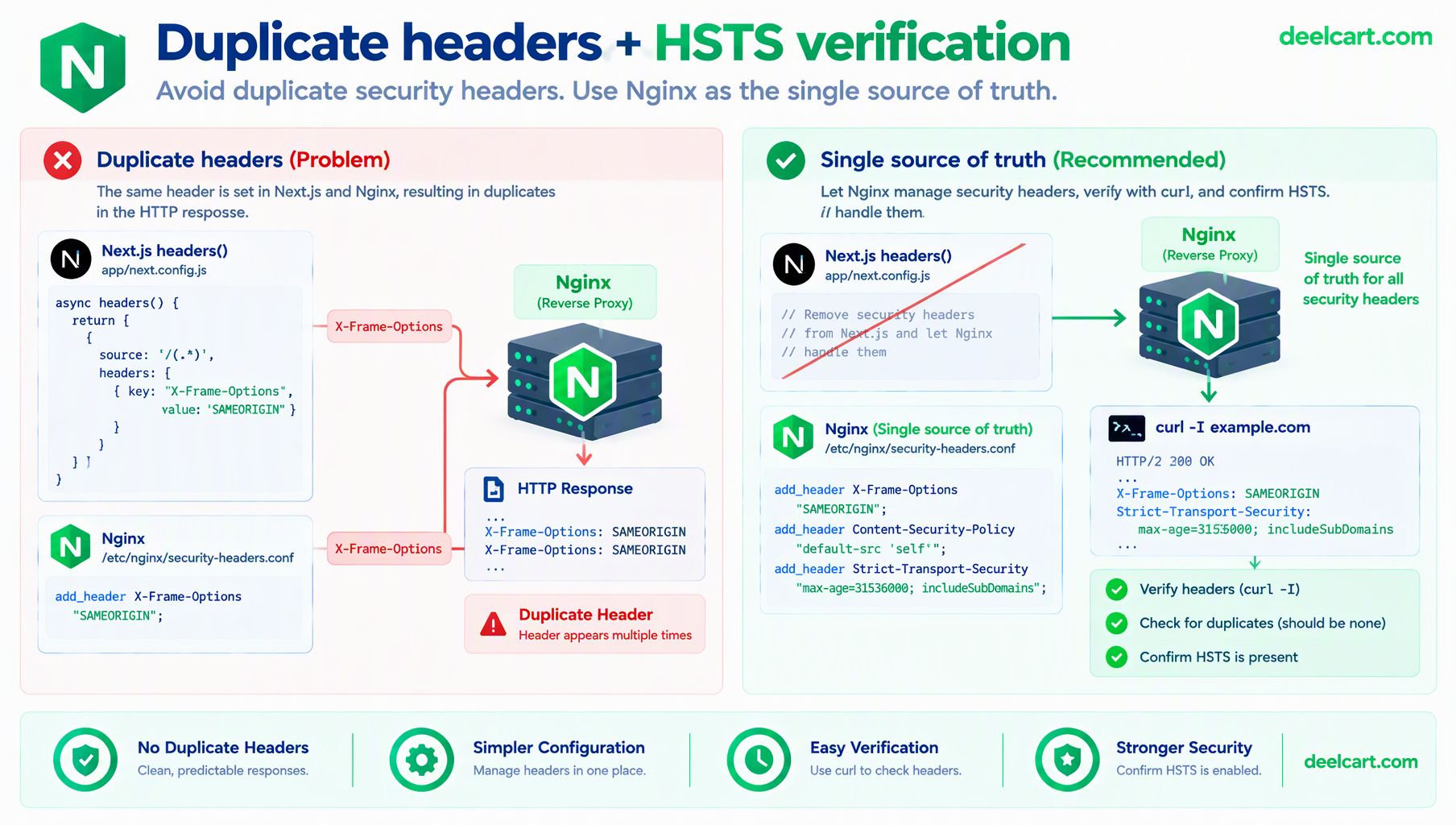
Look through the output for any header name appearing more than once. If you find a duplicate, pick exactly one layer as the source of truth and remove it from the other — with multiple apps behind one shared Nginx config, I standardized on Nginx being the single source of truth for these headers and removed the equivalent entries from every app's next.config.js, so there's one place to update rather than keeping N app-level configs in sync with the shared Nginx snippet.
What This Setup Deliberately Doesn't Cover
A real Content-Security-Policy (CSP) is the header that does the most for actual XSS defense, and it's deliberately not included in the snippet above — a CSP has to be tailored to what a specific app actually loads (which script sources, which style sources, which domains it fetches from), and a copy-pasted generic CSP is more likely to break a real app than protect it meaningfully. That's a per-app project of its own, not something to bolt on globally without testing each app against it individually.
Frequently Asked Questions
Will adding these headers break my site?
The headers in the base snippet (excluding HSTS) are low-risk and rarely break normal functionality, since they're restricting behavior most sites never rely on in the first place (being framed by another domain, browsers guessing content types). HSTS is the one genuinely worth testing carefully before deploying, specifically because of how it behaves if HTTPS isn't fully solid yet.
Should I set these headers in Nginx or in my application code?
For a single-app setup either works. For multiple apps behind one shared reverse proxy, setting them once in Nginx avoids maintaining duplicate configuration across every app, and avoids the duplicate-header problem entirely by only declaring each header in one place from the start.
How do I verify my headers are actually configured correctly after deploying?
curl -I https://yourdomain.com shows you the raw response headers directly, which is more reliable than checking browser dev tools alone. A free scanner like SecurityHeaders.com also gives a broader graded assessment against current best practices, which is a reasonable way to track whether you're missing anything beyond what's covered here.
Why not just use a Content-Security-Policy example from a tutorial?
A CSP restricts exactly which sources a page is allowed to load scripts, styles, and other resources from — get it wrong and you can silently break your own app's functionality (a font that fails to load, a script that gets blocked) rather than just leaving a gap in protection. It genuinely needs to be built against what your specific app actually loads, tested, and refined — not copied from a generic example and assumed correct.
Justin is a self-taught developer who builds and runs DeelCart himself — from the articles to the server it runs on. He manages his own Linux infrastructure and writes guides based on tools and workflows he actually uses day to day.