Handling Infinite Scroll and Lazy-Loaded Content Reliably in Playwright

The Flawed Quick Fix
The obvious first attempt is a fixed delay after loading the page, giving it time to load more content before reading the DOM:
await page.goto(url);
await page.waitForTimeout(3000); // "just wait a few seconds"
const content = await page.content();
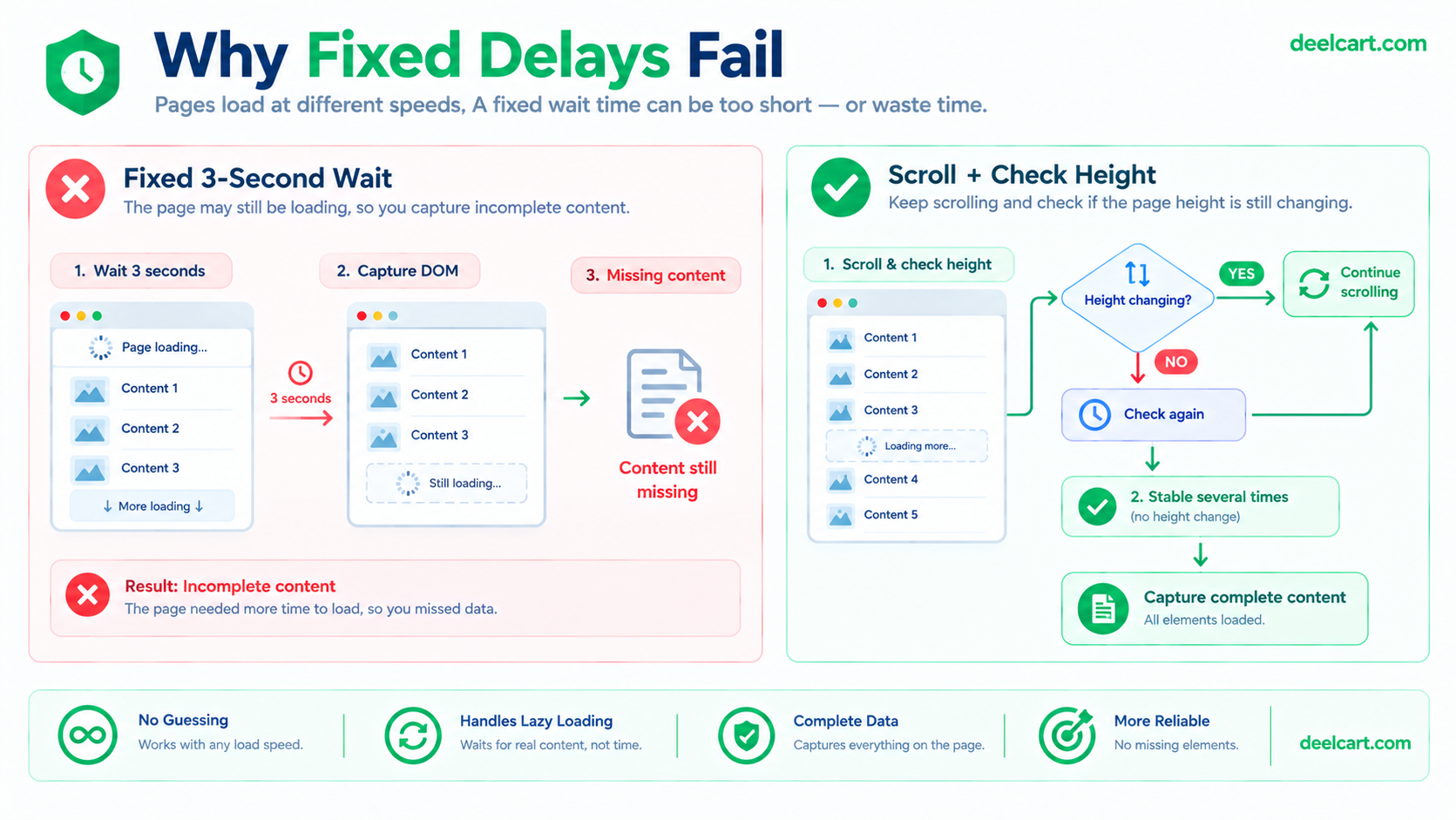
This is a bad fix for two reasons that pull in opposite directions. Set the delay too short, and a slow-loading page still gets cut off before everything's rendered — you're back to the original problem, just with extra wasted time before hitting it. Set it too long, and every single page load pays that full delay even when the content was ready in a fraction of the time, which adds up fast across any real scraping volume. A fixed timer can't adapt to either a fast page or a slow one — it's guessing at a number that's wrong for most real cases.
The Actual Fix: Poll Scroll Height Until It Stops Changing
The reliable approach doesn't guess at a duration at all — it scrolls down incrementally and watches the page's actual scroll height, continuing only until that height stops growing. A growing height means more content is still loading in; a height that's stopped changing across a couple of checks means you've genuinely reached the bottom, regardless of whether that took half a second or fifteen.
import { chromium } from 'playwright';

async function scrapeInfiniteScrollPage(url: string) {
  const browser = await chromium.launch({ headless: true });
  const page = await browser.newPage();
  await page.goto(url, { waitUntil: 'networkidle' });

  await page.evaluate(async () => {
    await new Promise<void>((resolve) => {
      let lastHeight = 0;
      let stableCount = 0;
      let scrollCount = 0;
      const maxScrolls = 50; // safety cap — see below

      const timer = setInterval(() => {
        window.scrollBy(0, window.innerHeight);
        scrollCount++;

        const currentHeight = document.body.scrollHeight;

        if (currentHeight === lastHeight) {
          stableCount++;
        } else {
          stableCount = 0; // height changed, still loading
          lastHeight = currentHeight;
        }

        // Height unchanged across a few consecutive checks = genuinely done
        const reachedBottom = stableCount >= 3;
        const hitSafetyLimit = scrollCount >= maxScrolls;

        if (reachedBottom || hitSafetyLimit) {
          clearInterval(timer);
          resolve();
        }
      }, 300);
    });
  });

  const content = await page.content();
  await browser.close();
  return content;
}
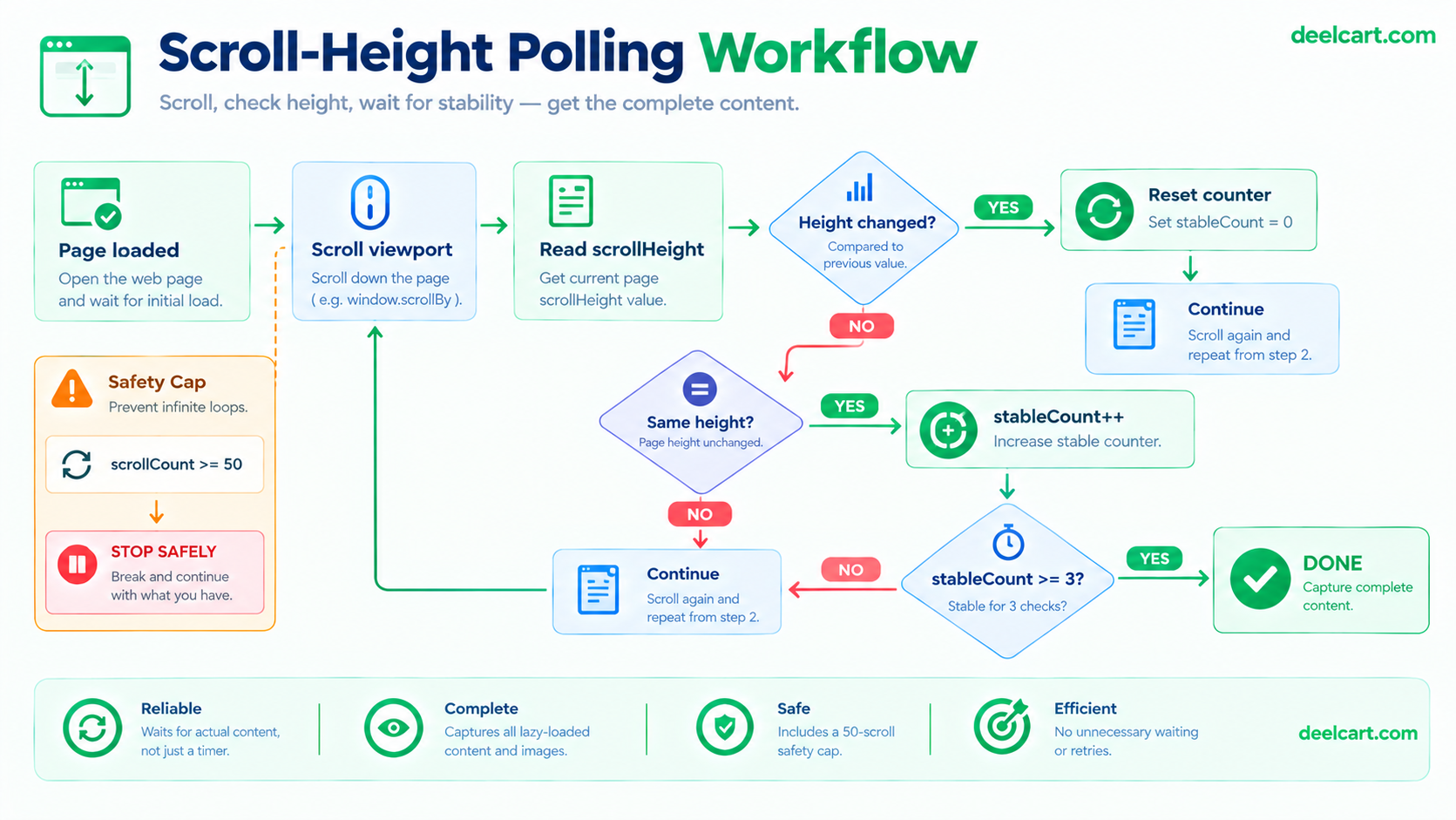
Two details here matter more than they look. First, checking stableCount >= 3 rather than stopping the instant height stops changing once — a single unchanged reading can happen mid-load, between one batch of content finishing render and the next batch's request still in flight. Requiring a few consecutive stable readings avoids stopping prematurely in that gap. Second, the interval between checks (300ms here) is a genuinely different thing from the flawed fixed-delay approach — this is a short polling interval used to *check* whether loading has finished, not a single long guessed wait *hoping* it has.
The Infinite Loop Trap
Not every scrollable page has a real bottom. A social feed or an endless recommendation timeline is designed to keep loading more content indefinitely — scrolling until height "stops changing" on a page like that means it never stops, and your script hangs, holding a browser instance open and consuming memory for as long as it runs.
The maxScrolls cap in the code above is exactly the guard against this — a hard ceiling on how many scroll iterations will run regardless of whether the height has stabilized. This should be treated as a required safety net any time you're scrolling a page you don't fully control the structure of, not an optional extra. Without it, one truly-infinite page in a batch job can hang that entire run.
Worth tuning maxScrolls and the stability threshold based on what you're actually scraping — a page with a genuine, finite end just needs enough scrolls to reach it comfortably; a feed-style page needs the cap set based on how much of it you actually need, since "the whole thing" isn't a defined endpoint at all.
Lazy-Loaded Images Are a Separate Problem
Getting the full DOM structure to load solves *layout* — it doesn't automatically solve *images*. Many sites use loading="lazy" on <img> tags, which means the browser intentionally delays fetching the image source until that element is near the viewport. Scrolling past an element quickly (as the loop above does, moving in large increments) can leave images in a state where the element exists in the DOM but its actual image content was never triggered to load — so a snapshot of the page can end up full of broken or empty image placeholders even though the surrounding layout is completely correct.
If the images themselves matter for what you're capturing (not just the surrounding text/structure), a targeted check is worth adding after the scroll loop completes:
const brokenImages = await page.evaluate(() => {
  const imgs = Array.from(document.querySelectorAll('img'));
  return imgs.filter(img => !img.complete || img.naturalWidth === 0).length;
});

if (brokenImages > 0) {
  // give lazy images a final chance to load before capturing
  await page.waitForTimeout(1000);
}
Using a fixed wait here is a reasonable, limited exception to the general rule against fixed delays — this is a small, bounded final settle step after the actual scrolling and content-loading logic has already done the real work, not a substitute for it.

Frequently Asked Questions
Does waitUntil: 'networkidle' alone solve this without any scrolling logic?
No — networkidle waits for network activity to quiet down after the *initial* page load, but content that only loads in response to a scroll event never fires until you actually scroll. A page can sit at network idle indefinitely while still having 90% of its content unloaded below the fold.
How do I know what scroll increment and interval to use?
There's no universal correct value — it depends on how the specific site loads content (some fire a new content batch every small scroll increment, others load in larger chunks tied to hitting specific scroll thresholds). Start with a moderate increment and interval, and increase the stability-check threshold if you find content is being cut off, or tighten the interval if scraping speed matters more than being maximally conservative.
Is this approach reliable across every site that uses infinite scroll?
It handles the common case — content that loads via scroll position — well. Some sites gate loading behind a "Load More" button click instead of scroll position, which needs its own separate click-and-wait logic rather than scroll polling. Others use more complex triggers (intersection observers tied to specific elements, not just raw scroll position) where you may need to wait for a specific element to appear rather than relying purely on height comparisons.
Should I run this headless or with a visible browser during development?
Headless is fine and faster for production runs once the logic is confirmed working. During development, running with headless: false and watching the actual scroll behavior is genuinely useful for spotting cases where content loads differently than expected — a stability threshold that looks correct in code can still miss an edge case that's obvious the moment you watch it happen visually.
Justin is a self-taught developer who builds and runs DeelCart himself — from the articles to the server it runs on. He manages his own Linux infrastructure and writes guides based on tools and workflows he actually uses day to day.